# GLOBEAU.KR 파일 기반 마크다운 뷰어 시스템 통합 명세서
(Technical Specification & System Manual for File-based Markdown Viewer)

---

## 문서 제어 및 개정 이력 (Document Control & Revision History)

### 기본 제어 정보
| 항목 | 내용 |
|---|---|
| **문서명** | GLOBEAU.KR 파일 기반 마크다운 뷰어 시스템 통합 명세서 |
| **현재 버전** | v1.2.0 |
| **최종 개정일** | 2026-10-16 |
| **작성/관리자** | 본사 시스템개발팀 |
| **적용 시스템** | GLOBEAU.KR 자체 기술 문서 센터 (/docs) |
| **문서 목적** | 데이터베이스 의존성 없는 파일 기반 마크다운 문서 시스템의 디렉토리 구조, 파싱 엔진, 검색 및 정렬 알고리즘, 반응형 UI/UX 인터랙션 표준 수립 |
| **문서 상태** | 개발 및 운영 공식 표준 (Production Standard) |

### 개정 및 변경 이력
| 버전 | 개정일자 | 구분 | 주요 변경 내역 | 작업자 |
|:---:|:---:|:---:|---|:---:|
| **v1.2.0** | 2026-10-16 | 기능개선 | • `01_readme.md` 기반 `section_key` 자연 순서 정렬(`strnatcasecmp`) 및 폴더 라벨(`section_label`) 표시 규격화<br>• 리스트 뷰의 물리 파일명 뱃지(`slug.md`) 및 제목 매핑 UI 정립<br>• PHP 8.4 PCRE 정규식 오류 방어(`\s*` 및 `\R` 호환) 및 BOM 자동 제거<br>• 모바일 터치 드래그/핀치 줌 라이트박스 및 5초 자동 숨김 플로팅 퀵 네비게이션 적용 | 개발팀 |
| **v1.1.0** | 2026-10-14 | 기능추가 | • 다중 키워드 검색 엔진 및 문맥 스니펫 발췌(파일당 5개 제한)<br>• URL 파라미터 기반 본문 검색어 실시간 자동 스크롤 및 포커스 하이라이팅 연동 | 개발팀 |
| **v1.0.0** | 2026-10-10 | 신규제정 | • 파일 기반 마크다운 뷰어 시스템 초기 아키텍처 설계 및 라우트/컨트롤러/뷰 제정 | 개발팀 |

---

## 1. 개요 및 기술 스택
- **시스템 명칭:** 파일 기반 마크다운 뷰어 시스템 (File-based Markdown Viewer System)
- **목적:** 데이터베이스 없이 서버 저장소에 위치한 마크다운(`.md`) 파일을 직접 읽어와 웹에서 체계적으로 조회, 폴더 및 `01_readme.md` 기반 섹션 자동 분류, 아코디언 토글, 뷰어 상태 유지(localStorage), 맞춤형 타이틀 매핑, 다중 키워드 검색, 모바일/PC 반응형 인터랙티브 이미지 라이트박스 및 플로팅 퀵 네비게이션을 지원하는 자체 문서 센터 구축
- **Tech Stack:**
  * **Backend:** Laravel 13, PHP 8.4, Apache Web Server, Laravel Storage Facade
  * **Frontend UI:** Bootstrap 5 (Collapse 아코디언, 반응형 그리드), FontAwesome 6, GitHub Official Markdown CSS (`github-markdown-light.min.css`)
  * **Markdown & Highlighting Engine:** `marked.js` (클라이언트 마크다운 파서 및 커스텀 렌더러), `highlight.js` (소스코드 신택스 하이라이팅)
  * **Diagram & Interactive Engine:** `mermaid.js` 10 (1:1 픽셀 고정 및 가로 스크롤 지원 다이어그램), Custom Touch/Mouse Interactive Lightbox (모바일 터치 드래그 및 핀치 줌 지원), Floating Quick Navigation (5초 자동 숨김 및 호버/터치 방어)

---

## 2. 파일 명명 규칙, 디렉토리 구조 및 리스트 표시 형식

### 2.1 문서 및 폴더 명명 규칙
- **문서 파일명 표준:** 대소문자 혼동 및 URL 인코딩 오류를 방지하기 위해 **모두 소문자와 언더바(`_`)를 조합한 형태**를 원칙으로 채택합니다. (예: `architecture.md`, `database.md`, `notification_template_manual_01.md`)
- **디렉토리 명명 표준:** 폴더명 역시 영문 소문자 및 언더바 조합 또는 장별 넘버링을 포함하여 작성합니다. (예: `chapter_01_architecture`, `chapter_02_database`, `general`)

### 2.2 저장소 구조 및 `01_readme.md` 메타데이터
- `storage/app/public/documents/` 하위에 폴더별 디렉토리를 생성하여 관리합니다.
- 각 폴더 내에 **`01_readme.md`** (또는 `readme.md`) 파일을 두어 해당 폴더의 섹션 메타데이터(`section_key`, `section_label`)를 정의합니다.
- **리스트 제외 대상:** `01_readme.md` 및 `readme.md` 파일은 섹션 메타데이터 정의 용도로만 사용되며, 웹 문서 목록 리스트에는 노출되지 않습니다.
- **루트 파일 처리:** 폴더가 없는 루트 디렉토리의 파일들은 리스트의 맨 마지막(`기타 문서` 섹션)에 자동 배치됩니다.

### 2.3 이미지 애셋 저장 및 마크다운 참조 규칙
- 이미지는 문서별로 격리 관리하기 위해 `storage/app/public/documents/images/{문서파일명}/` 디렉토리에 저장합니다.
- 마크다운 본문 내 이미지 참조 구문은 아래와 같이 상대 경로와 캡션 타이틀을 함께 명시합니다.
  
    ![대체텍스트](images/{문서파일명}/image.png "▲ [그림 번호] 캡션 타이틀 설명")
  
  *실제 작성 예시:*
  
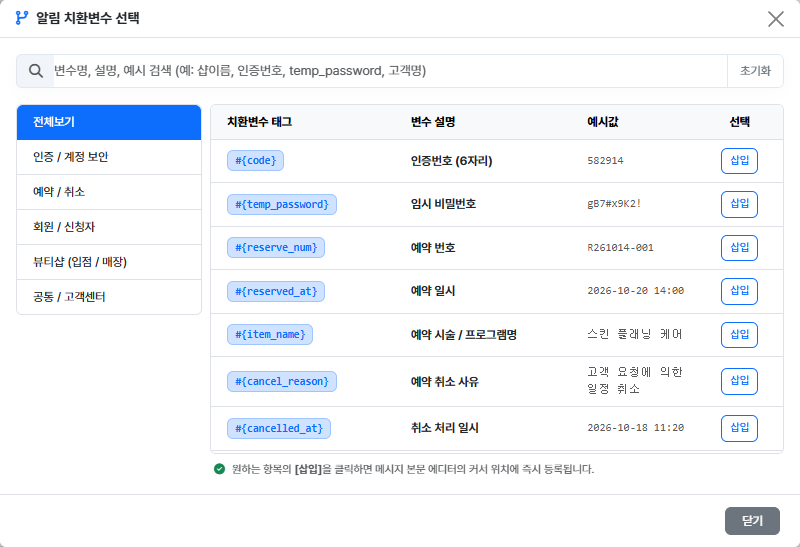
    ![알림 치환변수 선택 모달](images/notification_template_manual_01/image.png "▲ [그림 4-1] 알림 템플릿 치환변수 탐색 및 삽입 모달")
  
- 클라이언트 파서(`show.blade.php`)는 `images/...` 상대 경로를 브라우저 서빙용 절대 경로(`/storage/documents/images/...`)로 실시간 변환하여 렌더링합니다.

### 2.4 문서 리스트 화면의 폴더(섹션) 및 파일 이름 표시 형식 (UI/UX 렌더링 규격)

사용자 탐색 편의성과 개발자/운영자의 파일 식별성을 동시에 충족하기 위해 리스트 뷰는 아래의 시각적 계층 구조로 표시됩니다.

#### 1. 폴더(섹션) 아코디언 헤더 표시 형식
- **표시 명칭 (Label)**: 물리 폴더명(예: `01_notification`)을 그대로 노출하지 않고, 해당 폴더 내 `01_readme.md` 상단 Front Matter의 **`section_label`** 값을 읽어와 친절한 한글 타이틀로 노출합니다.
- **문서 건수 뱃지 (Count Badge)**: 섹션명 우측에 해당 폴더 내 포함된 실제 유효 마크다운 문서 개수를 Bootstrap 뱃지로 함께 표시합니다 (`<span class="badge bg-secondary ms-2">{docCount}</span>`).
- **섹션 정렬 기준 (Sort Order)**: Front Matter의 **`section_key`** 값(예: `chapter_1`, `chapter_2`, `chapter_10`)을 기준으로 자연 순서 정렬(Natural Sort)하여 표출 순서를 제어합니다. 폴더가 없는 루트 문서 그룹은 자동으로 최하단 `기타 문서`로 정렬됩니다.
- **시각 디자인 구조**:
  
    [북마크 아이콘] {section_label}  [문서개수 뱃지]                   [접기/펼치기 화살표]
    예: 📑 제1장 - 시스템 및 데이터베이스 설계  [ 5 ]                       ▼

#### 2. 개별 문서 아이템 표시 형식 (Item List)
아코디언을 펼쳤을 때 노출되는 개별 문서 목록은 3단계 정보(문서 타이틀, 물리 파일명, 수정 일시)를 한 행에 직관적으로 표출합니다.

- **문서 대표 타이틀 (`title`)**:
  - 개별 마크다운 파일 상단 Front Matter의 `title` 값을 파싱하여 굵고 선명한 텍스트(`fw-semibold fs-5 text-dark`)로 강조 표시합니다.
  - Front Matter에 title이 없을 경우 파일 슬러그(`slug`)의 언더바를 공백으로 치환하고 첫 글자를 대문자로 변환한 대체 타이틀을 사용합니다.
- **물리 파일명 뱃지 (`{slug}.md`)**:
  - 대표 타이틀 바로 우측에 연한 회색 배경의 고정폭 폰트 뱃지(`<span class="badge bg-light text-muted ms-2 font-monospace small">{slug}.md</span>`)를 병기합니다.
  - 운영자나 개발자가 실제 서버 저장소에서 수정해야 할 물리 파일의 이름을 한눈에 즉시 대조할 수 있습니다.
- **최종 수정 일시 (`updated_at`)**:
  - 아이템 우측 끝에 시계 아이콘과 함께 파일 시스템의 최종 변경 일시(`YYYY-MM-DD HH:mm:ss`)를 표기합니다.
- **검색 매칭 스니펫 (`snippet`)**:
  - 검색어(`?q=...`) 입력 시 제목 또는 본문에서 검색어가 발견된 위치의 앞뒤 문맥(약 80자)을 발췌하여 아이템 하단에 코드 스타일 박스로 표출합니다.
- **시각 디자인 구조**:
  
    [문서 아이콘] 시스템 아키텍처 및 구조 설계  [ architecture.md ]      🕒 2026-10-16 14:30  >
      └─ [코드 아이콘] ...시스템 아키텍처는 백엔드 Laravel 13과 연동되어...

### 2.5 주요 파일 및 경로 명세
- **라우트 파일:** `routes/web.php`
- **컨트롤러 파일:** `app/Http/Controllers/DocumentController.php`
- **문서 목록 및 검색 뷰:** `resources/views/documents/index.blade.php`
- **개별 문서 상세 뷰:** `resources/views/documents/show.blade.php`
- **마크다운 저장소:** `storage/app/public/documents/*.md`
- **문서 첨부 이미지 저장소:** `storage/app/public/documents/images/{문서파일명}/*.*`

### 2.6 라우트 설정 (`routes/web.php`)

    use App\Http\Controllers\DocumentController;

    Route::get('/docs', [DocumentController::class, 'index']);        // 문서 목록, 폴더별 아코디언 그룹화 및 다중 키워드 검색
    Route::get('/docs/{page}', [DocumentController::class, 'show']);  // 개별 문서 상세 보기 (상단 YAML 영역 자동 제거)

---

## 3. 백엔드 핵심 컨트롤러 (`app/Http/Controllers/DocumentController.php`)

### 3.1 Front Matter (YAML) 동적 파싱 및 PCRE 호환 정규식
- 파일 상단에 위치한 YAML 메타데이터 영역(`--- ... ---`)을 파싱하여 타이틀 및 섹션 정보를 동적으로 추출합니다.
- **PHP 8.4 PCRE 정규식 규격 준수**: 문자 클래스 내부(`[...]`)에 개행 시퀀스(`\R`)를 중첩 사용할 수 없는 PCRE 규칙을 준수하여, 파일 선두의 공백을 포괄하는 `^\s*---\s*\R(.*?)\R---\s*(?:\R|$)` 패턴을 채택했습니다.
- **BOM(Byte Order Mark) 자동 제거**: 윈도우 에디터 등에서 저장 시 삽입되는 UTF-8 BOM(`\xEF\xBB\xBF`)을 사전 제거하여 정규식 매칭 실패를 원천 차단합니다.

    ---
    title: 시스템 아키텍처 및 구조 설계
    section_key: chapter_1
    section_label: 제1장 - 시스템 및 데이터베이스 설계
    ---

### 3.2 `section_key` 기반 자연 정렬(Natural Sort) 및 폴더/루트 배치
- `storage/app/public/documents/` 하위 폴더들을 탐색하되, 첨부 이미지 저장소인 `images` 디렉토리는 목록에서 완전히 배제합니다.
- 폴더 내 `01_readme.md`를 분석하여 `section_key`와 `section_label`을 바인딩한 후, Laravel Collection의 `sort()`와 `strnatcasecmp` 함수를 활용해 **사람이 인지하는 순서(`chapter_1` → `chapter_2` → `chapter_10`)로 섹션 아코디언을 자연 정렬**합니다.
- 폴더가 없는 루트 문서 그룹(`general`)은 항상 리스트의 맨 마지막(`기타 문서`)에 배치되도록 정렬 우선순위를 보장합니다.
- 폴더 내부의 개별 마크다운 파일들은 파일명 오름차순(01, 02, 03...) 순서로 정렬됩니다.

### 3.3 다중 키워드 검색, 매칭 제한 및 스니펫 발췌
- 사용자가 입력한 검색어(`q`)를 분석하여 원본 구문, 공백 제거 형태, 2글자 이상의 개별 단어 조합으로 파싱합니다.
- 한 문서 내에서 검색 결과가 난립하지 않도록 **파일당 최대 5개 매칭 제한** 및 중복 위치 방지 로직을 적용하고, 주변 전후 텍스트를 발췌한 `snippet`과 고유 순번(`match_index`)을 부여합니다.
- 상세 뷰(`show`)와 동일하게 본문에서 YAML 영역을 사전에 제거한 순수 본문 텍스트를 대상으로 검색을 수행하므로, 상세 화면 진입 시 검색어 하이라이팅 순번(`index`) 오차가 발생하지 않습니다.

### 3.4 상세 보기 시 YAML 자동 제거 (`show`)
- 개별 문서를 조회할 때 정규식을 이용해 파일 상단의 YAML Front Matter 영역(`--- ... ---`)을 자동으로 제거하여, 순수 본문 마크다운 내용만 깔끔하게 뷰로 전달합니다.
- `basename($page)` 검증 및 `.md` 확장자 필터링을 통해 디렉토리 조작(Directory Traversal) 및 이미지 바이너리 파일 오호출을 차단합니다.

---

## 4. 프론트엔드 뷰 파이프라인

### 4.1 문서 목록 및 아코디언 뷰 (`resources/views/documents/index.blade.php`)
- 컨트롤러에서 `section_key` 순서대로 정렬된 섹션 배열(`$sections`)을 받아 Bootstrap Collapse 아코디언 UI를 렌더링합니다.
- 각 섹션 헤더에는 `section_label`과 문서 개수 뱃지가 표시되며, 클릭 시 하위 문서 리스트가 펼쳐집니다.
- 브라우저 `localStorage`를 연동하여 문서를 읽고 뒤로 가기를 눌렀을 때도 **이전에 열어두었던 아코디언 상태와 스크롤 위치가 완벽히 복원**됩니다.
- 검색 중일 때는 일치하는 문서를 바로 확인할 수 있도록 검색 결과가 포함된 섹션들이 자동으로 펼쳐집니다.

### 4.2 개별 문서 상세 뷰 및 고도화 인터랙션 UI (`resources/views/documents/show.blade.php`)

#### 1) 커스텀 렌더러 기반 마크다운 및 이미지 처리
- `marked.js` 커스텀 렌더러를 통해 이미지를 `<figure><img><figcaption></figure>` 구조로 감싸고, 마크다운 이미지 타이틀 속성을 그림 하단 캡션으로 자동 추출합니다.
- 본문 내 `images/...` 상대 경로는 웹 공개 디렉토리인 `/storage/documents/images/...` 절대 경로로 자동 치환됩니다.

#### 2) Mermaid 다이어그램 1:1 픽셀 크기 보존
- 반응형 뷰포트에 의해 다이어그램 내부 글자 크기가 임의로 축소되지 않도록 본문 기본 폰트(16px)를 강제 고정합니다.
- 다이어그램의 `svg.viewBox` 원본 폭을 `style.width`와 `min-width`에 픽셀 단위로 직접 주입하고, 화면 폭을 초과할 경우 가로 스크롤 컨테이너를 생성하여 가독성을 유지합니다.

#### 3) PC 마우스 & 모바일 터치 통합 인터랙티브 라이트박스 (Lightbox)
- 본문 이미지를 클릭하면 전체 화면 블러 오버레이 모달이 활성화됩니다.
- **2단계 뷰 모드:**
  - **화면 맞춤(Fit) 모드:** 화면 비율에 맞추어 이미지 전체를 한눈에 조망 (기본 상태)
  - **원본(100% Zoom) 모드:** 이미지를 클릭/탭하면 1:1 원본 해상도로 확대 전개
- **PC 인터랙션:**
  - 마우스 좌클릭 드래그를 통한 자유로운 캔버스 이동 (Pan)
  - 마우스 휠 스크롤을 통한 배율 확대/축소 (0.3x ~ 5.0x)
- **모바일 터치 인터랙션:**
  - `touch-action: none` 설정을 통해 모바일 브라우저의 기본 스크롤/새로고침 제스처 간섭 원천 차단
  - 1개 손가락 터치 드래그를 통한 부드러운 이미지 패닝 이동
  - 2개 손가락 핀치 줌(Pinch-to-zoom)을 통한 자유로운 실시간 배율 확대/축소
- **모달 종료 인터랙션:**
  - 우측 상단 닫기(`X`) 버튼 클릭
  - 이미지 외곽 어두운 배경 오버레이 클릭
  - 키보드 `ESC` 키 입력

#### 4) 우측 상단 픽스 플로팅 퀵 네비게이션 (Floating Quick Nav)
- 스크롤이 본문 아래로 150px 이상 내려갔을 때 우측 상단에 반투명 글래스모피즘 형태의 **[목록] + [TOP]** 버튼 묶음 레이어가 부드럽게 나타납니다.
- **검색 맥락 유지:** [목록] 버튼 클릭 시 사용자가 진입했던 검색어 파라미터(`?q=...`)를 그대로 보존하여 원래 검색 리스트 상태로 복귀합니다.
- **5초 자동 숨김 UX:** 스크롤이 멈춘 상태에서 5초 동안 추가 조작이 없으면 버튼 그룹이 화면 상단으로 자연스럽게 페이드아웃(`opacity: 0`, `translateY(-12px)`)되어 문서 독서 집중도를 극대화합니다.
- **호버 및 터치 방어 로직:** 사용자가 버튼을 클릭하기 위해 마우스를 올리고 있거나(Hover) 모바일 화면에서 터치하고 있는 동안에는 타이머가 일시 정지되어 버튼이 사라지지 않습니다. 스크롤을 다시 움직이면 즉시 재표출됩니다.

---

## 5. 부록: 전체 사용 파일 소스 코드 및 상세 코멘트

### A. 라우트 파일 (`routes/web.php`)

    <?php

    use Illuminate\Support\Facades\Route;
    use App\Http\Controllers\DocumentController;

    // 문서 센터 메인 목록 및 다중 키워드 검색 라우트
    Route::get('/docs', [DocumentController::class, 'index']);

    // 개별 마크다운 문서 상세 조회 라우트 (slug 기반)
    Route::get('/docs/{page}', [DocumentController::class, 'show']);

### B. 컨트롤러 파일 (`app/Http/Controllers/DocumentController.php`)

    <?php

    namespace App\Http\Controllers;

    use Illuminate\Http\Request;
    use Illuminate\Support\Facades\Storage;

    class DocumentController extends Controller
    {
        /**
         * 문서 목록 및 다중 키워드 검색 처리
         */
        public function index(Request $request)
        {
            $disk = Storage::disk('public');
            
            // 1. documents 하위 폴더 목록 조회 ('images' 디렉토리 제외)
            $rawDirectories = $disk->directories('documents');
            $directories = array_values(array_filter($rawDirectories, function ($dir) {
                return basename($dir) !== 'images';
            }));

            // 루트 파일(폴더 없음) 처리를 위해 빈 문자열 추가
            $allFolders = array_merge($directories, ['']);
            
            $searchQuery = trim($request->input('q', ''));
            $documents = [];

            // 검색어 파싱 및 다중 키워드 조합 생성
            $searchKeywords = [];
            if (!empty($searchQuery)) {
                $lowerQuery = mb_strtolower($searchQuery);
                $searchKeywords[] = $lowerQuery;

                $splitted = preg_split('/\s+/', $searchQuery);
                if (count($splitted) > 1) {
                    $searchKeywords[] = mb_strtolower(implode('', $splitted));
                    
                    foreach ($splitted as $word) {
                        $word = trim($word);
                        if (mb_strlen($word) >= 2) {
                            $searchKeywords[] = mb_strtolower($word);
                        }
                    }
                }
                $searchKeywords = array_unique($searchKeywords);
            }

            foreach ($allFolders as $folder) {
                $folderPath = $folder === '' ? 'documents' : $folder;
                $files = $disk->files($folderPath);

                // 1. 해당 폴더의 섹션 기본값 (01_readme.md가 없을 경우 대체값)
                $section = [
                    'key'   => $folder === '' ? 'zzz_general' : basename($folder),
                    'label' => $folder === '' ? '기타 문서' : ucfirst(basename($folder))
                ];

                // 2. 01_readme.md 또는 readme.md 파일에서 section_key, section_label 오버라이드
                foreach ($files as $file) {
                    $fileName = strtolower(basename($file));
                    if (in_array($fileName, ['01_readme.md', 'readme.md'])) {
                        $readmeContent = $disk->get($file);
                        $readmeInfo = $this->parseFrontMatter($readmeContent);

                        if (!empty($readmeInfo['section']['key']) && $readmeInfo['section']['key'] !== 'appendix') {
                            $section = $readmeInfo['section'];
                        }
                        break;
                    }
                }

                // 폴더 내 마크다운 파일 오름차순 정렬
                sort($files);

                foreach ($files as $file) {
                    if (in_array(strtolower(pathinfo($file, PATHINFO_EXTENSION)), ['md', 'markdown'])) {
                        $fileName = strtolower(basename($file));
                        
                        // readme 파일은 문서 목록에서 제외
                        if (in_array($fileName, ['01_readme.md', 'readme.md'])) {
                            continue;
                        }

                        $slug = pathinfo($file, PATHINFO_FILENAME);
                        $rawContent = $disk->get($file);
                        $updatedAt = date('Y-m-d H:i:s', $disk->lastModified($file));
                        
                        $docInfo = $this->parseFrontMatter($rawContent);
                        $title = $docInfo['title'] ?? ucfirst(str_replace('_', ' ', $slug));
                        $cleanBody = $this->stripFrontMatter($rawContent);

                        if (empty($searchQuery)) {
                            $documents[] = [
                                'slug'          => $slug,
                                'title'         => $title,
                                'snippet'       => '',
                                'updated_at'    => $updatedAt,
                                'match_index'   => 1,
                                'keyword'       => '',
                                'section_key'   => $section['key'],
                                'section_label' => $section['label'],
                                'folder'        => $folder
                            ];
                            continue;
                        }

                        $lowerContent = mb_strtolower($cleanBody);
                        $lowerTitle = mb_strtolower($title);
                        $fileMatchCount = 0;    
                        $matchedPositions = []; 

                        foreach ($searchKeywords as $kw) {
                            if (str_contains($lowerTitle, $kw)) {
                                $hash = 'title_' . $kw;
                                if (!isset($matchedPositions[$hash])) {
                                    if ($fileMatchCount >= 5) break; 
                                    
                                    $matchedPositions[$hash] = true;
                                    $fileMatchCount++;

                                    $documents[] = [
                                        'slug'          => $slug,
                                        'title'         => $title,
                                        'snippet'       => "제목에서 '{$kw}' 항목을 찾았습니다.",
                                        'updated_at'    => $updatedAt,
                                        'match_index'   => $fileMatchCount,
                                        'keyword'       => $kw,
                                        'section_key'   => $section['key'],
                                        'section_label' => $section['label'],
                                        'folder'        => $folder
                                    ];
                                }
                            }

                            $offset = 0;
                            while (($pos = mb_strpos($lowerContent, $kw, $offset)) !== false) {
                                if ($fileMatchCount >= 5) break 2; 

                                $hash = $pos . '_' . $kw;
                                if (!isset($matchedPositions[$hash])) {
                                    $matchedPositions[$hash] = true;
                                    $fileMatchCount++;

                                    $start = max(0, $pos - 40);
                                    $length = mb_strlen($kw) + 80;
                                    $snippet = '...' . trim(mb_substr($cleanBody, $start, $length)) . '...';

                                    $documents[] = [
                                        'slug'          => $slug,
                                        'title'         => $title,
                                        'snippet'       => $snippet,
                                        'updated_at'    => $updatedAt,
                                        'match_index'   => $fileMatchCount,
                                        'keyword'       => $kw,
                                        'section_key'   => $section['key'],
                                        'section_label' => $section['label'],
                                        'folder'        => $folder
                                    ];
                                }

                                $offset = $pos + mb_strlen($kw);
                            }
                        }
                    }
                }
            }

            // section_key 기준 자연 정렬 (chapter_1 -> chapter_2 -> chapter_10 순서 보장, 루트 문서는 맨 뒤)
            $grouped = collect($documents)->groupBy('section_key');

            $sortedSections = $grouped->sort(function ($docsA, $docsB) {
                $keyA = (string)($docsA->first()['section_key'] ?? '');
                $keyB = (string)($docsB->first()['section_key'] ?? '');

                $isGeneralA = in_array($keyA, ['general', 'zzz_general', 'appendix']);
                $isGeneralB = in_array($keyB, ['general', 'zzz_general', 'appendix']);

                if ($isGeneralA && !$isGeneralB) return 1;
                if (!$isGeneralA && $isGeneralB) return -1;

                return strnatcasecmp($keyA, $keyB);
            });

            // Blade 뷰 전달용 1차원 배열 조립
            $sectionsArray = [];
            foreach ($sortedSections as $sectionKey => $docs) {
                $firstDoc = $docs->first();
                $sectionsArray[] = [
                    'key'   => $sectionKey,
                    'label' => is_array($firstDoc) ? ($firstDoc['section_label'] ?? '기타 문서') : '기타 문서',
                    'docs'  => $docs->toArray()
                ];
            }

            return view('documents.index', [
                'sections'    => $sectionsArray,
                'searchQuery' => $searchQuery
            ]);
        }

        /**
         * 개별 문서 상세 보기
         */
        public function show($page = 'architecture')
        {
            $disk = Storage::disk('public');
            $safePage = basename($page);
            $path = "documents/{$safePage}.md";
            
            if (!$disk->exists($path)) {
                $allFiles = $disk->allFiles('documents');
                $foundPath = null;
                
                foreach ($allFiles as $f) {
                    $ext = strtolower(pathinfo($f, PATHINFO_EXTENSION));
                    if (in_array($ext, ['md', 'markdown']) && pathinfo($f, PATHINFO_FILENAME) === $safePage) {
                        $foundPath = $f;
                        break;
                    }
                }

                if (!$foundPath || !$disk->exists($foundPath)) {
                    abort(404);
                }
                $path = $foundPath;
            }

            $rawContent = $disk->get($path);
            $markdownContent = $this->stripFrontMatter($rawContent);

            return view('documents.show', [
                'markdownContent' => $markdownContent,
                'page'            => $safePage
            ]);
        }

        /**
         * YAML Front Matter 파서 (BOM, 개행, 따옴표 완벽 방어 및 PCRE 호환)
         */
        private function parseFrontMatter(string $content): array
        {
            $title = null;
            $section = [
                'key'   => 'appendix',
                'label' => '부록'
            ];

            // UTF-8 BOM 제거
            $content = preg_replace('/^\xEF\xBB\xBF/', '', $content);

            // 상단 Front Matter 추출 (\s* 와 단독 \R 사용)
            if (preg_match('/^\s*---\s*\R(.*?)\R---\s*(?:\R|$)/s', $content, $matches)) {
                $yaml = $matches[1];
                
                if (preg_match('/^title:\s*(.*)$/m', $yaml, $tMatch)) {
                    $title = trim($tMatch[1], " \t\n\r\0\x0B'\"");
                }
                
                preg_match('/^section_key:\s*(.*)$/m', $yaml, $keyMatch);
                preg_match('/^section_label:\s*(.*)$/m', $yaml, $labelMatch);

                $parsedKey = isset($keyMatch[1]) ? trim($keyMatch[1], " \t\n\r\0\x0B'\"") : '';
                $parsedLabel = isset($labelMatch[1]) ? trim($labelMatch[1], " \t\n\r\0\x0B'\"") : '';
                
                if (!empty($parsedKey) && !empty($parsedLabel)) {
                    $section = [
                        'key'   => $parsedKey,
                        'label' => $parsedLabel
                    ];
                }
            }

            return [
                'title'   => $title,
                'section' => $section
            ];
        }

        /**
         * 상단 YAML Front Matter 영역 제거 헬퍼
         */
        private function stripFrontMatter(string $content): string
        {
            $content = preg_replace('/^\xEF\xBB\xBF/', '', $content);
            return preg_replace('/^\s*---\s*\R.*?\R---\s*(?:\R|$)/s', '', $content) ?? $content;
        }
    }

### C. 문서 목록 및 검색 뷰 (`resources/views/documents/index.blade.php`)

    <!DOCTYPE html>
    <html lang="ko">
    <head>
        <meta charset="UTF-8">
        <meta name="viewport" content="width=device-width, initial-scale=1.0">
        <title>GLOBEAU.KR Docs - 문서 검색 센터</title>
        <link href="https://cdn.jsdelivr.net/npm/bootstrap@5.3.3/dist/css/bootstrap.min.css" rel="stylesheet">
        <link href="https://cdnjs.cloudflare.com/ajax/libs/font-awesome/6.4.0/css/all.min.css" rel="stylesheet">
        <style>
            body { background-color: #f0f2f5; font-family: -apple-system, BlinkMacSystemFont, "Segoe UI", Roboto, "Noto Sans KR", sans-serif; }
            .doc-container { max-width: 950px; margin: 50px auto; padding: 0 20px; }
            .doc-card { background: #fff; border: 1px solid #e1e4e8; border-radius: 10px; padding: 30px; box-shadow: 0 4px 15px rgba(0,0,0,0.04); }
            .doc-item { padding: 18px 20px; border-bottom: 1px solid #f1f5f9; transition: background 0.2s; display: block; text-decoration: none; color: #334155; }
            .doc-item:hover { background-color: #f8fafc; color: #0284c7; }
            .doc-item:last-child { border-bottom: none; }
            .snippet { font-size: 0.85rem; color: #64748b; background: #f8fafc; padding: 6px 10px; border-radius: 4px; margin-top: 6px; font-family: monospace; }
            .section-header { cursor: pointer; user-select: none; }
            .section-header:hover { background-color: #e2e8f0 !important; }
            .section-header .fa-chevron-down { transition: transform 0.3s; }
            .section-header.collapsed .fa-chevron-down { transform: rotate(-90deg); }
        </style>
    </head>
    <body>
        <div class="doc-container">
            <div class="mb-4">
                <h2 class="fw-bold text-dark mb-1"><i class="fas fa-book-open text-primary me-2"></i> GLOBEAU.KR 기술 문서 센터</h2>
                <p class="text-muted mb-0">전체 마크다운 문서의 본문과 제목을 대상으로 키워드를 검색합니다.</p>
            </div>

            <div class="doc-card">
                <!-- 검색 폼 -->
                <form action="{{ url('/docs') }}" method="GET" class="input-group mb-4">
                    <span class="input-group-text bg-white text-muted"><i class="fas fa-search"></i></span>
                    <input type="text" name="q" value="{{ $searchQuery ?? '' }}" class="form-control" placeholder="DB 컬럼명, 함수명, 키워드 등을 입력하세요...">
                    <button class="btn btn-primary px-4" type="submit">검색</button>
                    @if(!empty($searchQuery))
                        <a href="{{ url('/docs') }}" class="btn btn-outline-secondary">초기화</a>
                    @endif
                </form>

                @if(!empty($searchQuery))
                    <div class="mb-3 text-muted small">
                        <i class="fas fa-info-circle"></i> "<strong>{{ $searchQuery }}</strong>" 검색 결과가 조회되었습니다.
                    </div>
                @endif

                <div class="d-flex flex-column gap-3">
                    @forelse($sections as $section)
                        @php
                            $sectionKey     = $section['key'] ?? '';
                            $sectionLabel   = $section['label'] ?? '기타 문서';
                            $docs           = $section['docs'] ?? [];
                            $isExpanded     = !empty($searchQuery);
                            $docCount       = count($docs);
                            $collapsedClass = $isExpanded ? '' : 'collapsed';
                            $showClass      = $isExpanded ? 'show' : '';
                            $expandedAttr   = $isExpanded ? 'true' : 'false';
                        @endphp

                        <div class="border rounded overflow-hidden bg-white mb-3">
                            <div class="px-3 py-3 bg-light text-secondary fw-bold border-bottom d-flex justify-content-between align-items-center section-header {{ $collapsedClass }}"
                                 data-bs-toggle="collapse" 
                                 data-bs-target="#section-{{ $sectionKey }}" 
                                 aria-expanded="{{ $expandedAttr }}" 
                                 aria-controls="section-{{ $sectionKey }}"
                                 style="padding: 12px 16px;">
                                <div>
                                    <i class="fas fa-bookmark me-1 text-primary"></i> {{ $sectionLabel }} 
                                    <span class="badge bg-secondary ms-2" style="font-size: 0.75rem;">{{ $docCount }}</span>
                                </div>
                                <div>
                                    <i class="fas fa-chevron-down small text-muted"></i>
                                </div>
                            </div>

                            <div class="collapse {{ $showClass }}" id="section-{{ $sectionKey }}">
                                <div class="list-group list-group-flush">
                                    @foreach($docs as $doc)
                                        @php
                                            $slug       = $doc['slug'] ?? '';
                                            $title      = $doc['title'] ?? '';
                                            $updatedAt  = $doc['updated_at'] ?? '';
                                            $keyword    = $doc['keyword'] ?? '';
                                            $matchIndex = $doc['match_index'] ?? 1;
                                            $snippet    = $doc['snippet'] ?? '';

                                            $queryParams = [];
                                            if (!empty($keyword)) {
                                                $queryParams['highlight'] = $keyword;
                                                $queryParams['index'] = $matchIndex;
                                            }
                                            if (!empty($searchQuery)) {
                                                $queryParams['q'] = $searchQuery;
                                            }

                                            $url = url('/docs/' . $slug . (!empty($queryParams) ? '?' . http_build_query($queryParams) : ''));
                                        @endphp

                                        <a href="{{ $url }}" class="doc-item">
                                            <div class="d-flex justify-content-between align-items-center">
                                                <div>
                                                    <i class="fas fa-file-alt text-secondary me-2"></i>
                                                    <span class="fw-semibold fs-5">{{ $title }}</span>
                                                    <span class="badge bg-light text-muted ms-2 font-monospace small">{{ $slug }}.md</span>
                                                </div>
                                                <div class="text-muted small">
                                                    <i class="far fa-clock me-1"></i> {{ $updatedAt }}
                                                    <i class="fas fa-chevron-right ms-2 small"></i>
                                                </div>
                                            </div>
                                            @if(!empty($snippet))
                                                <div class="snippet text-truncate">
                                                    <i class="fas fa-code text-primary me-1"></i> {{ $snippet }}
                                                </div>
                                            @endif
                                        </a>
                                    @endforeach
                                </div>
                            </div>
                        </div>
                    @empty
                        <div class="text-center py-5 text-muted">
                            <i class="fas fa-search fa-2x mb-2 text-secondary opacity-50"></i>
                            <p class="mb-0">일치하는 문서 내용을 찾을 수 없습니다.</p>
                        </div>
                    @endforelse
                </div>
            </div>
        </div>

        <script src="https://cdn.jsdelivr.net/npm/bootstrap@5.3.3/dist/js/bootstrap.bundle.min.js"></script>
        <script>
            if ('scrollRestoration' in history) {
                history.scrollRestoration = 'auto';
            }

            document.addEventListener("DOMContentLoaded", function () {
                const isSearching = @json(!empty($searchQuery));
                
                if (!isSearching) {
                    document.querySelectorAll('.collapse').forEach(function (collapseElement) {
                        const sectionId = collapseElement.id;
                        const savedState = localStorage.getItem('doc_section_' + sectionId);
                        const header = document.querySelector(`[data-bs-target="#${sectionId}"]`);
                        
                        if (savedState === 'show') {
                            collapseElement.classList.add('show');
                            if (header) {
                                header.classList.remove('collapsed');
                                header.setAttribute('aria-expanded', 'true');
                            }
                        } else if (savedState === 'hide') {
                            collapseElement.classList.remove('show');
                            if (header) {
                                header.classList.add('collapsed');
                                header.setAttribute('aria-expanded', 'false');
                            }
                        }
                    });

                    document.querySelectorAll('.collapse').forEach(function (collapseElement) {
                        collapseElement.addEventListener('shown.bs.collapse', function () {
                            localStorage.setItem('doc_section_' + this.id, 'show');
                        });
                        collapseElement.addEventListener('hidden.bs.collapse', function () {
                            localStorage.setItem('doc_section_' + this.id, 'hide');
                        });
                    });
                }
            });
        </script>
    </body>
    </html>

### D. 개별 문서 상세 뷰 (`resources/views/documents/show.blade.php`)

    <!DOCTYPE html>
    <html lang="ko">
    <head>
        <meta charset="UTF-8">
        <meta name="viewport" content="width=device-width, initial-scale=1.0, maximum-scale=5.0, user-scalable=yes">
        <title>GLOBEAU.KR Docs - 상세 문서</title>
        <!-- 부트스트랩 5 CSS -->
        <link rel="stylesheet" href="https://cdn.jsdelivr.net/npm/bootstrap@5.3.3/dist/css/bootstrap.min.css">
        <!-- 폰트어썸 6 -->
        <link rel="stylesheet" href="https://cdnjs.cloudflare.com/ajax/libs/font-awesome/6.4.0/css/all.min.css">
        
        <!-- GitHub 공식 마크다운 스타일 -->
        <link rel="stylesheet" href="https://cdnjs.cloudflare.com/ajax/libs/github-markdown-css/5.5.1/github-markdown-light.min.css">
        
        <!-- 코드 블록 신택스 하이라이팅 테마 (Stackoverflow Dark) -->
        <link rel="stylesheet" href="https://cdnjs.cloudflare.com/ajax/libs/highlight.js/11.9.0/styles/stackoverflow-dark.min.css">
        
        <style>
            body {
                background-color: #f0f2f5;
                font-family: -apple-system, BlinkMacSystemFont, "Segoe UI", Roboto, "Noto Sans KR", Helvetica, Arial, sans-serif;
                color: #24292f;
            }

            .doc-container {
                max-width: 1100px;
                margin: 40px auto;
                padding: 0 20px;
            }

            .markdown-body {
                box-sizing: border-box;
                padding: 60px;
                background-color: #ffffff;
                border: 1px solid #e1e4e8;
                border-radius: 12px;
                box-shadow: 0 4px 20px rgba(0, 0, 0, 0.05);
                font-size: 16px;
                line-height: 1.7;
            }

            /* =====================================================================
               🌟 우측 상단 고정 플로팅 퀵 네비게이션 레이어 (목록 + TOP 버튼 묶음)
               ===================================================================== */
            .floating-quick-nav {
                position: fixed;
                top: 24px;
                right: 28px;
                display: inline-flex;
                align-items: center;
                background: rgba(255, 255, 255, 0.94);
                backdrop-filter: blur(10px);
                -webkit-backdrop-filter: blur(10px);
                border: 1px solid rgba(209, 213, 219, 0.85);
                box-shadow: 0 6px 20px rgba(0, 0, 0, 0.12);
                border-radius: 30px;
                padding: 4px 6px;
                z-index: 999;
                opacity: 0;
                visibility: hidden;
                transform: translateY(-12px);
                /* 나타나고 사라질 때 0.35초 동안 부드럽게 전환 */
                transition: opacity 0.35s ease, transform 0.35s ease, visibility 0.35s;
            }

            /* 스크롤 발생 시 활성화 */
            .floating-quick-nav.show {
                opacity: 1;
                visibility: visible;
                transform: translateY(0);
            }

            /* 마우스 호버 시 5초 타이머와 상관없이 강제 유지 */
            .floating-quick-nav:hover {
                opacity: 1 !important;
                visibility: visible !important;
                transform: translateY(0) !important;
            }

            .quick-nav-btn {
                display: inline-flex;
                align-items: center;
                gap: 6px;
                padding: 6px 14px;
                border-radius: 20px;
                font-size: 0.84rem;
                font-weight: 600;
                color: #4b5563;
                text-decoration: none;
                background: transparent;
                border: none;
                cursor: pointer;
                transition: all 0.18s ease;
                line-height: 1.2;
                white-space: nowrap;
            }

            .quick-nav-btn:hover {
                color: #0d6efd;
                background-color: #f1f5f9;
            }

            .quick-nav-btn.btn-top:hover {
                color: #ff6b00; /* 오렌지 포인트 */
                background-color: #fff7ed;
            }

            .quick-nav-btn i {
                font-size: 0.85rem;
            }

            .quick-nav-divider {
                width: 1px;
                height: 16px;
                background-color: #e2e8f0;
                margin: 0 2px;
            }

            /* 🌟 Mermaid 다이어그램: 1:1 픽셀 유지 및 가로 스크롤 대응 */
            .markdown-body .mermaid {
                display: block !important;
                width: 100%;
                overflow-x: auto;
                -webkit-overflow-scrolling: touch;
                background-color: #ffffff;
                border: 1px solid #d0d7de;
                border-radius: 10px;
                padding: 24px;
                margin: 2.2rem 0;
                box-sizing: border-box;
                box-shadow: 0 4px 14px rgba(0, 0, 0, 0.05);
            }

            .markdown-body .mermaid svg {
                display: block !important;
                height: auto !important;
                max-width: none !important;
                flex-shrink: 0 !important;
            }

            .markdown-body .mermaid svg .nodeLabel,
            .markdown-body .mermaid svg .node foreignObject div,
            .markdown-body .mermaid svg text {
                font-size: 16px !important;
                line-height: 1.6 !important;
                font-family: -apple-system, BlinkMacSystemFont, "Segoe UI", Roboto, "Noto Sans KR", sans-serif !important;
                text-align: left !important;
            }

            /* 본문 이미지 */
            .markdown-body figure {
                display: block;
                margin: 2.2rem 0;
                padding: 0 !important;
                border: none !important;
                background: transparent !important;
                text-align: center;
            }

            .markdown-body figure img,
            .markdown-body img {
                display: inline-block;
                max-width: 100%;
                height: auto;
                background-color: #ffffff;
                border: 1px solid #d0d7de !important;
                border-radius: 8px !important;
                box-shadow: 0 4px 14px rgba(0, 0, 0, 0.08) !important;
                margin: 0 auto;
                cursor: zoom-in;
                transition: transform 0.2s ease, box-shadow 0.2s ease;
            }

            .markdown-body figure img:hover,
            .markdown-body img:hover {
                transform: translateY(-2px);
                box-shadow: 0 8px 20px rgba(0, 0, 0, 0.12) !important;
            }

            .markdown-body figcaption {
                display: block;
                margin-top: 10px;
                font-size: 0.875rem;
                color: #6a737d;
                font-weight: 500;
                text-align: center;
            }

            /* 반응형 테이블 */
            .markdown-body .table-responsive {
                width: 100%;
                overflow-x: auto;
                -webkit-overflow-scrolling: touch;
                margin-bottom: 1.5rem;
                background-color: transparent;
                border: none !important;
            }

            .markdown-body table {
                width: 100% !important;
                margin-bottom: 0 !important;
                background-color: #ffffff;
            }
            
            .markdown-body th, 
            .markdown-body td {
                white-space: nowrap;
                padding: 12px 16px !important;
            }

            .markdown-body blockquote {
                padding: 14px 20px;
                color: #24292e;
                background-color: #f6f8fa;
                border-left: 4px solid #0366d6;
                border-radius: 0 6px 6px 0;
                margin: 1.5rem 0;
            }

            .markdown-body pre {
                background-color: #0b0f19 !important;
                border-radius: 8px !important;
                padding: 20px !important;
                border: 1px solid #30363d;
                box-shadow: inset 0 2px 4px rgba(0, 0, 0, 0.8);
                position: relative;
                overflow-x: auto;
            }

            .markdown-body pre code {
                background-color: transparent !important;
                color: #ffffff !important;
                padding: 0 !important;
                font-family: SFMono-Regular, Consolas, "Liberation Mono", Menlo, Courier, monospace;
                font-size: 0.95rem;
                line-height: 1.6;
            }

            .markdown-body pre code span {
                color: #ffffff !important;
            }

            /* =====================================================================
               라이트박스 모달
               ===================================================================== */
            .lightbox-overlay {
                position: fixed;
                top: 0;
                left: 0;
                width: 100vw;
                height: 100vh;
                background-color: rgba(15, 23, 42, 0.94);
                backdrop-filter: blur(8px);
                -webkit-backdrop-filter: blur(8px);
                z-index: 10000;
                display: flex;
                align-items: center;
                justify-content: center;
                opacity: 0;
                visibility: hidden;
                transition: opacity 0.2s ease, visibility 0.2s ease;
                overflow: hidden;
                user-select: none;
                -webkit-user-select: none;
                touch-action: none;
            }

            .lightbox-overlay.active {
                opacity: 1;
                visibility: visible;
            }

            .lightbox-img.is-fit {
                position: relative !important;
                max-width: 92vw !important;
                max-height: 85vh !important;
                width: auto !important;
                height: auto !important;
                object-fit: contain;
                cursor: zoom-in !important;
                border-radius: 8px;
                box-shadow: 0 16px 45px rgba(0, 0, 0, 0.65);
                border: 1px solid rgba(255, 255, 255, 0.15);
                background-color: #ffffff;
                transition: transform 0.2s ease, box-shadow 0.2s ease;
                touch-action: auto;
            }

            .lightbox-img.is-zoomed {
                position: absolute !important;
                max-width: none !important;
                max-height: none !important;
                width: auto !important;
                height: auto !important;
                cursor: grab !important;
                border-radius: 6px;
                box-shadow: 0 20px 50px rgba(0, 0, 0, 0.75);
                border: 1px solid rgba(255, 255, 255, 0.15);
                background-color: #ffffff;
                -webkit-user-drag: none;
                will-change: transform;
                transform-origin: center center;
                touch-action: none !important;
            }

            .lightbox-img.is-zoomed.is-dragging {
                cursor: grabbing !important;
            }

            .lightbox-toolbar {
                position: absolute;
                top: 24px;
                left: 50%;
                transform: translateX(-50%);
                display: flex;
                align-items: center;
                gap: 12px;
                z-index: 10001;
                pointer-events: none;
            }

            .lightbox-hint {
                background: rgba(0, 0, 0, 0.7);
                color: #e2e8f0;
                padding: 8px 18px;
                border-radius: 30px;
                font-size: 0.82rem;
                border: 1px solid rgba(255, 255, 255, 0.15);
                box-shadow: 0 4px 12px rgba(0, 0, 0, 0.3);
                white-space: nowrap;
            }

            .lightbox-scale-badge {
                background: rgba(15, 23, 42, 0.88);
                color: #38bdf8;
                font-weight: 700;
                padding: 8px 16px;
                border-radius: 30px;
                font-size: 0.82rem;
                border: 1px solid rgba(56, 189, 248, 0.35);
                display: none;
                box-shadow: 0 4px 12px rgba(0, 0, 0, 0.3);
            }

            .lightbox-close-btn {
                position: absolute;
                top: 24px;
                right: 28px;
                width: 44px;
                height: 44px;
                border-radius: 50%;
                background: rgba(0, 0, 0, 0.55);
                border: 1px solid rgba(255, 255, 255, 0.25);
                color: #ffffff;
                font-size: 1.25rem;
                display: flex;
                align-items: center;
                justify-content: center;
                cursor: pointer;
                transition: background 0.2s, transform 0.2s;
                z-index: 10001;
            }

            .lightbox-close-btn:hover {
                background: rgba(255, 255, 255, 0.25);
                transform: scale(1.08);
            }

            /* 모바일 반응형 처리 */
            @media (max-width: 767px) {
                .markdown-body {
                    padding: 24px 18px;
                }
                .doc-container {
                    margin: 15px auto;
                    padding: 0 10px;
                }
                .floating-quick-nav {
                    top: 14px;
                    right: 14px;
                    padding: 3px 5px;
                }
                .quick-nav-btn {
                    padding: 5px 10px;
                    font-size: 0.78rem;
                    gap: 4px;
                }
                .lightbox-toolbar {
                    top: 16px;
                    width: calc(100% - 90px);
                    left: 16px;
                    transform: none;
                }
                .lightbox-close-btn {
                    top: 16px;
                    right: 16px;
                    width: 40px;
                    height: 40px;
                }
            }
        </style>
    </head>
    <body>

        @php
            $backUrl = url('/docs') . (request()->has('q') ? '?q=' . urlencode(request()->get('q')) : '');
        @endphp

        <!-- 🌟 우측 상단 고정 플로팅 퀵 네비게이션 레이어 (목록 + TOP 버튼 묶음) -->
        <div id="floating-quick-nav" class="floating-quick-nav" aria-label="빠른 이동 메뉴">
            <a href="{{ $backUrl }}" class="quick-nav-btn btn-list" title="문서 목록으로 이동">
                <i class="fas fa-list-ul"></i>
                <span>목록</span>
            </a>
            <div class="quick-nav-divider"></div>
            <button type="button" id="btn-scroll-top" class="quick-nav-btn btn-top" title="최상단으로 이동">
                <i class="fas fa-arrow-up"></i>
                <span>TOP</span>
            </button>
        </div>

        <div class="doc-container">
            <!-- 상단 네비게이션 헤더 -->
            <div class="top-bar mb-3">
                <a href="{{ $backUrl }}" class="btn btn-outline-secondary btn-sm">
                    <i class="fas fa-arrow-left me-1"></i> {{ request()->has('q') ? '검색 결과로 돌아가기' : '문서 목록으로' }}
                </a>
            </div>

            <!-- 마크다운 문서 본문 렌더링 영역 -->
            <article class="markdown-body" id="doc-content">
                <div class="text-center py-5 text-muted">
                    <i class="fas fa-spinner fa-spin fa-2x"></i>
                    <p class="mt-2">문서를 불러오는 중입니다...</p>
                </div>
            </article>
        </div>

        <!-- 인터랙티브 라이트박스 모달 -->
        <div id="lightbox-modal" class="lightbox-overlay" aria-hidden="true">
            <div class="lightbox-toolbar">
                <div class="lightbox-hint" id="lightbox-hint">
                    <span class="d-none d-md-inline"><i class="fas fa-search-plus me-1"></i> 클릭: 원본(100%) 보기 | 휠: 확대·축소</span>
                    <span class="d-inline d-md-none"><i class="fas fa-hand-pointer me-1"></i> 터치: 원본 보기 | 두 손가락: 확대·축소</span>
                </div>
                <div class="lightbox-scale-badge" id="lightbox-scale-badge">100%</div>
            </div>

            <button type="button" class="lightbox-close-btn" id="lightbox-close" aria-label="닫기">
                <i class="fas fa-times"></i>
            </button>

            <img id="lightbox-target-img" class="lightbox-img is-fit" src="" alt="">
        </div>

        <!-- 파서 및 라이브러리 로드 -->
        <script src="https://cdn.jsdelivr.net/npm/marked/marked.min.js"></script>
        <script src="https://cdnjs.cloudflare.com/ajax/libs/highlight.js/11.9.0/highlight.min.js"></script>
        <script src="https://cdn.jsdelivr.net/npm/mermaid@10/dist/mermaid.min.js"></script>
        
        <script>
            const rawMarkdown = @json($markdownContent ?? '');

            // 1. marked 커스텀 렌더러 설정
            const customRenderer = new marked.Renderer();

            customRenderer.image = function(href, title, text) {
                if (typeof href === 'object' && href !== null) {
                    title = href.title;
                    text = href.text;
                    href = href.href;
                }

                const captionHtml = title 
                    ? `<figcaption>${title}</figcaption>` 
                    : '';

                return `
                    <figure>
                        <img src="${href}" alt="${text \vert{}\vert{} ''}" title="${title || ''}">
                        ${captionHtml}
                    </figure>
                `;
            };

            customRenderer.code = function(code, lang, escaped) {
                if (typeof code === 'object' && code !== null) {
                    lang = code.lang;
                    code = code.text;
                }

                if (lang === 'mermaid') {
                    return `<div class="mermaid">${code}</div>`;
                }

                const targetLang = (lang && hljs.getLanguage(lang)) ? lang : (lang || 'php');
                const highlighted = hljs.getLanguage(targetLang)
                    ? hljs.highlight(code, { language: targetLang }).value
                    : hljs.highlightAuto(code).value;

                return `<pre><code class="language-${targetLang}">${highlighted}</code></pre>`;
            };

            marked.setOptions({
                renderer: customRenderer,
                gfm: true,
                breaks: true
            });

            // 2. 상대 경로 이미지를 스토리지 절대 경로(/storage/documents/)로 자동 보정
            let processedMarkdown = rawMarkdown
                .replace(/!\[(.*?)\]\((?!https?:\/\/|\/)([^"\s)]+)(.*?\))/g, '![$1](/storage/documents/$2$3')
                .replace(/<img\s+([^>]*?)src=["'](?!https?:\/\/|\/)([^"']+)["']/gi, '<img $1src="/storage/documents/$2"');

            // 3. 파싱 및 HTML 주입
            let parsedHtml = marked.parse(processedMarkdown);
            document.getElementById('doc-content').innerHTML = parsedHtml;

            // 모든 테이블에 가로 스크롤 래퍼 자동 적용
            document.querySelectorAll('.markdown-body table').forEach((table) => {
                const wrapper = document.createElement('div');
                wrapper.className = 'table-responsive';
                table.parentNode.insertBefore(wrapper, table);
                wrapper.appendChild(table);
            });

            // 4. Mermaid 초기화 및 1:1 픽셀 크기 고정
            if (window.mermaid && document.querySelector('.mermaid')) {
                try {
                    mermaid.initialize({
                        startOnLoad: false,
                        theme: 'default',
                        themeVariables: {
                            fontSize: '16px'
                        },
                        securityLevel: 'loose',
                        flowchart: {
                            useMaxWidth: false,
                            htmlLabels: true
                        },
                        fontFamily: '-apple-system, BlinkMacSystemFont, "Segoe UI", Roboto, "Noto Sans KR", sans-serif'
                    });

                    mermaid.run({
                        querySelector: '.mermaid'
                    }).then(() => {
                        document.querySelectorAll('.markdown-body .mermaid svg').forEach((svg) => {
                            const vb = svg.viewBox ? svg.viewBox.baseVal : null;
                            if (vb && vb.width > 0) {
                                svg.style.setProperty('width', `${vb.width}px`, 'important');
                                svg.style.setProperty('min-width', `${vb.width}px`, 'important');
                                svg.style.setProperty('max-width', 'none', 'important');
                            }
                        });
                    }).catch(err => console.warn('Mermaid 렌더링 경고:', err));
                } catch (e) {
                    console.warn('Mermaid 초기화 실패:', e);
                }
            }

            // =====================================================================
            // 🌟 5. 플로팅 퀵 네비게이션 (스크롤 감지 + 5초 자동 숨김 + TOP 이동)
            // =====================================================================
            const floatingQuickNav = document.getElementById('floating-quick-nav');
            const btnScrollTop = document.getElementById('btn-scroll-top');

            let hideNavTimer = null;
            const HIDE_DELAY = 5000; // 5초 후 자동 숨김

            // 타이머 시작 함수 (5초 무동작 시 부드럽게 숨김)
            function startHideTimer() {
                clearTimeout(hideNavTimer);
                hideNavTimer = setTimeout(() => {
                    floatingQuickNav.classList.remove('show');
                }, HIDE_DELAY);
            }

            // 스크롤 이벤트 감지
            window.addEventListener('scroll', () => {
                const currentScrollY = window.scrollY;

                if (currentScrollY > 150) {
                    // 스크롤 발생 시 즉시 레이어 표출
                    floatingQuickNav.classList.add('show');
                    // 스크롤이 멈춘 시점부터 5초 타이머 카운트다운 시작
                    startHideTimer();
                } else {
                    // 최상단 근처(150px 이하)에서는 타이머 리셋 후 즉시 숨김
                    clearTimeout(hideNavTimer);
                    floatingQuickNav.classList.remove('show');
                }
            }, { passive: true });

            // PC 마우스 호버 보호: 버튼 위에 마우스가 있는 동안 타이머 일시정지
            floatingQuickNav.addEventListener('mouseenter', () => {
                clearTimeout(hideNavTimer);
            });

            // 마우스가 버튼 밖으로 벗어나면 다시 5초 카운트다운 시작
            floatingQuickNav.addEventListener('mouseleave', () => {
                if (window.scrollY > 150) {
                    startHideTimer();
                }
            });

            // 모바일 터치 보호: 손가락으로 누르는 동안 타이머 일시정지
            floatingQuickNav.addEventListener('touchstart', () => {
                clearTimeout(hideNavTimer);
            }, { passive: true });

            // 터치가 끝났을 때 다시 5초 카운트다운 시작
            floatingQuickNav.addEventListener('touchend', () => {
                if (window.scrollY > 150) {
                    startHideTimer();
                }
            }, { passive: true });

            // TOP 버튼 부드러운 스크롤 이동
            btnScrollTop.addEventListener('click', (e) => {
                e.preventDefault();
                window.scrollTo({
                    top: 0,
                    behavior: 'smooth'
                });
            });

            // =====================================================================
            // 6. [PC 마우스 + 모바일 터치 드래그 + 핀치 줌] 통합 라이트박스 로직
            // =====================================================================
            const lightboxModal = document.getElementById('lightbox-modal');
            const lightboxImg = document.getElementById('lightbox-target-img');
            const lightboxCloseBtn = document.getElementById('lightbox-close');
            const lightboxScaleBadge = document.getElementById('lightbox-scale-badge');
            const lightboxHint = document.getElementById('lightbox-hint');

            let isFitMode = true;
            let scale = 1.0;
            let translateX = 0;
            let translateY = 0;
            let isDragging = false;
            let dragStartX = 0;
            let dragStartY = 0;
            let dragDistance = 0;

            let initialPinchDist = 0;
            let initialScale = 1.0;

            function updateTransform() {
                lightboxImg.style.transform = `translate(${translateX}px, ${translateY}px) scale(${scale})`;
                lightboxScaleBadge.textContent = `${Math.round(scale * 100)}%`;
            }

            function setFitMode() {
                isFitMode = true;
                scale = 1.0;
                translateX = 0;
                translateY = 0;
                lightboxImg.classList.remove('is-zoomed', 'is-dragging');
                lightboxImg.classList.add('is-fit');
                lightboxImg.style.transform = '';
                lightboxScaleBadge.style.display = 'none';
                lightboxHint.innerHTML = `
                    <span class="d-none d-md-inline"><i class="fas fa-search-plus me-1"></i> 클릭: 원본(100%) 보기 | 휠: 확대·축소</span>
                    <span class="d-inline d-md-none"><i class="fas fa-hand-pointer me-1"></i> 터치: 원본 보기 | 두 손가락: 확대·축소</span>
                `;
            }

            function setZoomedMode(initialScaleVal = 1.0) {
                isFitMode = false;
                scale = initialScaleVal;
                translateX = 0;
                translateY = 0;
                lightboxImg.classList.remove('is-fit');
                lightboxImg.classList.add('is-zoomed');
                updateTransform();
                lightboxScaleBadge.style.display = 'block';
                lightboxHint.innerHTML = `
                    <span class="d-none d-md-inline"><i class="fas fa-arrows-alt me-1"></i> 드래그: 이동 | 휠: 확대·축소 | 클릭: 맞춤 복귀</span>
                    <span class="d-inline d-md-none"><i class="fas fa-arrows-alt me-1"></i> 드래그: 이동 | 핀치: 확대·축소 | 탭: 맞춤 복귀</span>
                `;
            }

            function openLightbox(src, alt) {
                lightboxImg.src = src;
                lightboxImg.alt = alt || '';
                setFitMode();
                lightboxModal.classList.add('active');
                lightboxModal.setAttribute('aria-hidden', 'false');
                document.body.style.overflow = 'hidden';
            }

            function closeLightbox() {
                lightboxModal.classList.remove('active');
                lightboxModal.setAttribute('aria-hidden', 'true');
                document.body.style.overflow = '';
                setTimeout(() => {
                    lightboxImg.src = '';
                    setFitMode();
                }, 200);
            }

            document.querySelectorAll('.markdown-body img').forEach((img) => {
                img.addEventListener('click', (e) => {
                    e.stopPropagation();
                    openLightbox(img.src, img.alt);
                });
            });

            lightboxImg.addEventListener('click', (e) => {
                e.stopPropagation();
                if (dragDistance > 8) return;
                if (isFitMode) {
                    setZoomedMode(1.0);
                } else {
                    setFitMode();
                }
            });

            // PC 마우스 드래그
            lightboxImg.addEventListener('mousedown', (e) => {
                if (e.button !== 0 || isFitMode) return;
                isDragging = true;
                dragDistance = 0;
                dragStartX = e.clientX - translateX;
                dragStartY = e.clientY - translateY;
                lightboxImg.classList.add('is-dragging');
                e.preventDefault();
            });

            window.addEventListener('mousemove', (e) => {
                if (!isDragging) return;
                const newX = e.clientX - dragStartX;
                const newY = e.clientY - dragStartY;
                dragDistance += Math.hypot(newX - translateX, newY - translateY);
                translateX = newX;
                translateY = newY;
                updateTransform();
            });

            window.addEventListener('mouseup', () => {
                if (isDragging) {
                    isDragging = false;
                    lightboxImg.classList.remove('is-dragging');
                }
            });

            // 모바일 터치 드래그 및 핀치 줌
            lightboxImg.addEventListener('touchstart', (e) => {
                if (isFitMode) return;

                if (e.touches.length === 1) {
                    isDragging = true;
                    dragDistance = 0;
                    dragStartX = e.touches[0].clientX - translateX;
                    dragStartY = e.touches[0].clientY - translateY;
                    lightboxImg.classList.add('is-dragging');
                } else if (e.touches.length === 2) {
                    isDragging = false;
                    initialPinchDist = Math.hypot(
                        e.touches[0].clientX - e.touches[1].clientX,
                        e.touches[0].clientY - e.touches[1].clientY
                    );
                    initialScale = scale;
                }
            }, { passive: false });

            window.addEventListener('touchmove', (e) => {
                if (isFitMode) return;

                if (e.touches.length === 1 && isDragging) {
                    e.preventDefault();
                    const newX = e.touches[0].clientX - dragStartX;
                    const newY = e.touches[0].clientY - dragStartY;
                    dragDistance += Math.hypot(newX - translateX, newY - translateY);
                    translateX = newX;
                    translateY = newY;
                    updateTransform();
                } else if (e.touches.length === 2) {
                    e.preventDefault();
                    const currentDist = Math.hypot(
                        e.touches[0].clientX - e.touches[1].clientX,
                        e.touches[0].clientY - e.touches[1].clientY
                    );
                    if (initialPinchDist > 0) {
                        const pinchFactor = currentDist / initialPinchDist;
                        scale = Math.min(Math.max(parseFloat((initialScale * pinchFactor).toFixed(2)), 0.3), 5.0);
                        updateTransform();
                    }
                }
            }, { passive: false });

            window.addEventListener('touchend', (e) => {
                if (e.touches.length === 0) {
                    isDragging = false;
                    lightboxImg.classList.remove('is-dragging');
                }
            });

            // PC 마우스 휠 줌
            lightboxModal.addEventListener('wheel', (e) => {
                e.preventDefault();
                if (isFitMode) setZoomedMode(1.0);
                const zoomFactor = e.deltaY < 0 ? 1.15 : 0.87;
                scale = parseFloat(Math.min(Math.max(scale * zoomFactor, 0.3), 5.0).toFixed(2));
                updateTransform();
            }, { passive: false });

            lightboxModal.addEventListener('click', (e) => {
                if (e.target === lightboxModal) closeLightbox();
            });

            lightboxCloseBtn.addEventListener('click', (e) => {
                e.stopPropagation();
                closeLightbox();
            });

            document.addEventListener('keydown', (e) => {
                if (e.key === 'Escape' && lightboxModal.classList.contains('active')) {
                    closeLightbox();
                }
            });

            // 7. 검색어 하이라이트 및 자동 스크롤
            const urlParams = new URLSearchParams(window.location.search);
            const highlightQuery = urlParams.get('highlight');
            const targetIndex = parseInt(urlParams.get('index') || '1', 10);

            if (highlightQuery) {
                setTimeout(() => {
                    scrollToTargetOccurrence(highlightQuery, targetIndex);
                }, 300);
            }

            function scrollToTargetOccurrence(keyword, targetIdx) {
                window.getSelection().removeAllRanges();
                window.scrollTo({ top: 0, behavior: 'instant' });

                let foundCount = 0;
                let lastSuccessRange = null;

                for (let i = 0; i < targetIdx; i++) {
                    const found = window.find(keyword, false, false, true, false, false, false);
                    if (!found) break;
                    foundCount++;
                    const selection = window.getSelection();
                    if (selection.rangeCount > 0) {
                        lastSuccessRange = selection.getRangeAt(0);
                    }
                }

                if (foundCount === targetIdx && lastSuccessRange) {
                    const selection = window.getSelection();
                    selection.removeAllRanges();
                    selection.addRange(lastSuccessRange);

                    try {
                        const span = document.createElement('mark');
                        span.style.backgroundColor = '#f59e0b';
                        span.style.color = '#ffffff';
                        span.style.padding = '2px 6px';
                        span.style.borderRadius = '4px';
                        span.style.fontWeight = 'bold';
                        span.style.boxShadow = '0 0 0 2px rgba(245, 158, 11, 0.4)';
                        
                        lastSuccessRange.surroundContents(span);
                        span.scrollIntoView({ behavior: 'smooth', block: 'center' });
                    } catch (e) {
                        const selectedNode = lastSuccessRange.commonAncestorContainer;
                        const targetElement = selectedNode.nodeType === 1 ? selectedNode : selectedNode.parentNode;
                        if (targetElement) {
                            targetElement.scrollIntoView({ behavior: 'smooth', block: 'center' });
                        }
                    }
                }
            }
        </script>
    </body>
    </html>